Vernum
SMS Verification · Virtual Number

Temporary Virtual Number for WhatsApp SMS Verification

Need a second WhatsApp account, or just don't want to hand out your real number? Rent a temporary number and see the WhatsApp code right in your panel.

190+ countries Instant delivery Automatic refund
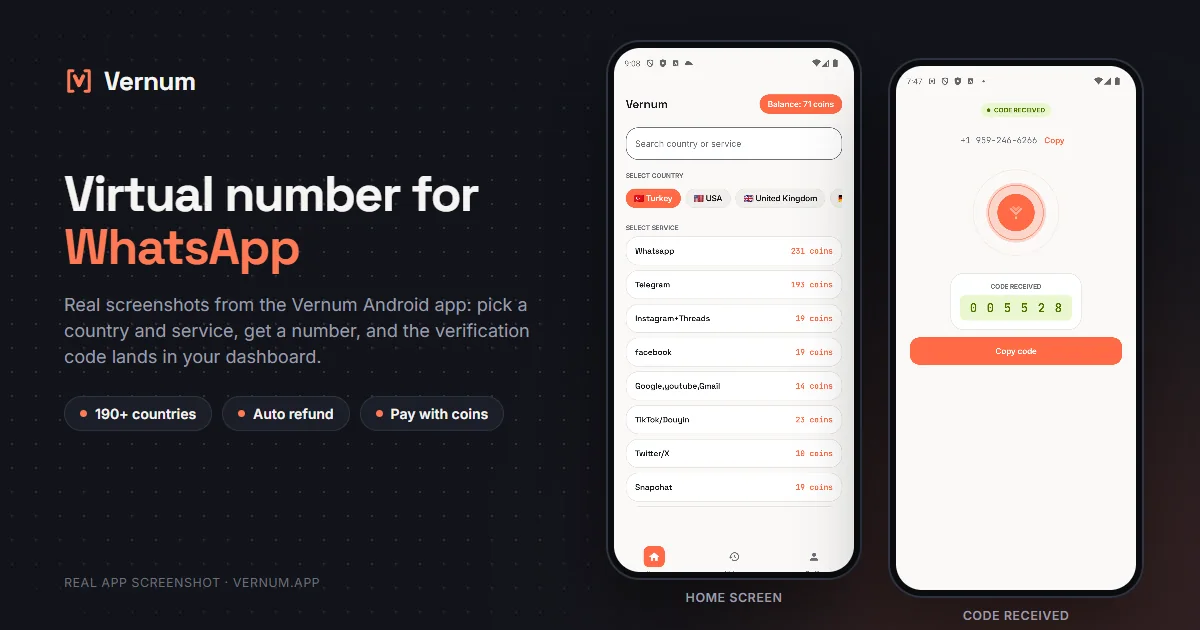
Vernum Android app screenshots: choosing a country and service on the home screen, then the received SMS verification code for WhatsApp
Real app screens: pick a country and service, get a number, and the WhatsApp verification code lands in your dashboard.

Why a virtual number for WhatsApp?

WhatsApp ties every account to a phone number; when you need a separate line for a business profile, a second account, or plain privacy, buying a new SIM is slow and expensive. A virtual number solves this: rent a real one-time number from Vernum, type it into WhatsApp, and the 6-digit verification code lands straight in your Vernum panel.

The number is reserved only for your activation and released after the code arrives. If no code ever arrives, your coins are refunded automatically — there is nothing to lose.

Get your code in three steps

1

Pick a country and service

Select the WhatsApp service in the panel; countries are sorted by measured success rate.

2

Get your number instantly

A real number is assigned to you, ready to receive the code.

3

See the code in your dashboard

Enter the number in WhatsApp; the incoming verification code appears instantly in your panel and as a notification.

Step by step: verifying WhatsApp with a virtual number

Keep the Vernum dashboard and WhatsApp open side by side and the sequence below gets you through in the fewest moves.

  1. In the Vernum dashboard, type WhatsApp into the service search and select it. Countries are sorted by measured success rate, so pick one near the top for your first try; if you have enough coin, a number is assigned right away.
  2. The assigned number appears with its country code and a countdown timer next to it. Copy the number. From this moment it is reserved for you alone, and any SMS it receives lands on this screen.
  3. Open WhatsApp. On the phone number screen, first pick the same country from the dropdown that Vernum shows, then type the number without the country code. WhatsApp adds the code itself; typing both makes the number invalid.
  4. Tap Next and confirm the number so WhatsApp sends the SMS. Switch back to Vernum: the 6-digit code usually shows up within seconds in the dashboard and as an Android notification, with no need to refresh.
  5. Enter the code in WhatsApp. If the timer runs out before a code arrives, your coin is refunded to your balance automatically; drop that number and immediately try again with the next country on the list.
  6. As soon as your profile name is set and you are in, go to Settings > Account > Two-step verification, create a PIN, and add an email. Because the number is single-use, this PIN is the most important layer keeping the account yours later on.

Which country's numbers work best?

For WhatsApp verification, UK, Netherlands and France numbers usually show the highest success rates. The Vernum app sorts the country list by real measured delivery success, so starting from the top of that list maximizes your chance of getting the code.

WhatsApp virtual number prices

Catalog snapshot from 2026-09-05 — the countries where WhatsApp numbers are cheapest, in coins. 1 coin ≈ $0.01; see the catalog page for live prices and all 195 countries.

CountryPrice
🇿🇦 South Africa53 coins
🇵🇸 Palestine56 coins
🇰🇪 Kenya60 coins
🇨🇲 Cameroon61 coins
🇮🇩 Indonesia61 coins
🇦🇬 Antigua and Barbuda93 coins

Common mistakes in WhatsApp verification

Typing the country code twice

WhatsApp automatically adds the code of the country you picked from the dropdown. If you type the number with +44 in front, a second 44 gets prepended and the SMS never goes out.

Waiting for a phone call

When the SMS does not arrive, WhatsApp offers a 'Call me' option. Vernum only receives SMS, so skip the call, let the timer run, and request a fresh SMS with a new number if needed.

Waiting for a code after the timer ends

Once the timer expires, the number goes back to the pool and your coin is refunded. Any SMS that reaches that number afterwards is not shown to you, so rent a new number instead of waiting.

Reusing the number for a second account

Numbers are single-use. Do not try to open a second WhatsApp account or re-verify with the same number after the first verification; rent a fresh number for every account.

Virtual number or your own number?

The right choice depends on how long you will keep the account and what you will use it for.

SituationRecommendation
Your main WhatsApp account of many yearsYour own number: when you switch phones or restore a backup, WhatsApp sends a new code to the same number, and a virtual number is no longer reachable.
Separating work and personal chatsVirtual number: you get a separate profile without buying a second SIM; just add the two-step verification PIN right away.
A one-off group or eventVirtual number: you join without handing your real number to people you do not know, and delete the account when it is over.
Payments or a verified business profileYour own number: WhatsApp Business and payment features may ask you to verify the number again, so a permanent line is the safer choice.

Why Vernum?

🎯 Sorted by success rate

The country list is ordered by real measured delivery success — you choose by data, not luck.

↩️ Automatic refund

If the timer runs out before a code arrives, your coins return to your balance on their own.

🌍 190+ countries

A live catalog refreshed hourly, with dozens of operator pools per country.

💬 A second WhatsApp account

Keep work and personal chats apart: open a second WhatsApp profile without buying a SIM.

Frequently asked questions

How do I get a virtual number for WhatsApp?

Create a Vernum account, add coins, then pick a country and the WhatsApp service. A number is assigned instantly; enter it in WhatsApp and the incoming SMS code shows up in your panel.

Will a WhatsApp account opened with a virtual number keep working?

Yes — once activated, the account keeps working. The number itself is single-use though, so if WhatsApp ever asks to re-verify you may not have access to it again. For accounts you plan to keep, enable WhatsApp's two-step verification PIN.

What happens if the code doesn't arrive?

If the number expires before a code arrives, the coins you spent are refunded to your balance automatically. You can retry immediately with a different country or operator.

Is using a virtual number legal?

Yes — renting a virtual number and using it for WhatsApp verification is legal; it is a legitimate privacy tool for keeping your real number to yourself. WhatsApp's own rules are about how the account is used: fraud, spam or impersonation are prohibited there as on any platform.

How long is the number mine?

The number is reserved for you until the WhatsApp code arrives; once the code shows in your dashboard and verification is done, the number goes back to the pool. If WhatsApp ever asks to re-verify you may not have access to the same number, so enable WhatsApp's two-step verification PIN right after creating the account.

Can I receive the code a second time on the same number?

While the timer is running and no code has arrived yet, tapping 'Resend SMS' in WhatsApp delivers the new message to the same dashboard. Once a code has arrived and verification is complete, the number returns to the pool; if WhatsApp asks for a code again later, you will need to rent a new number. That is why you should enter the code as soon as it shows up.

Does WhatsApp accept virtual numbers?

Vernum numbers are real carrier numbers, and WhatsApp sends SMS to them. Some numbers may still be rejected by WhatsApp because they were used before; in that case no code arrives, your coin is refunded when the timer ends, and you try again with a different country.

Can I use it for a WhatsApp Business account too?

Yes. The WhatsApp Business app uses the same SMS verification. You select the WhatsApp service in the dashboard as usual and the code lands there the same way. If you want a permanent business number to hand out to customers, your own line makes more sense, since a virtual number returns to the pool after verification.

Is there a free temporary number for WhatsApp?

Free receive-SMS websites list the same few public numbers for everyone. Anyone can read the codes on the page, and WhatsApp has usually seen those numbers many times, so they tend to be rejected or already tied to another account. A number rented on Vernum is assigned only to you for the activation window and the code appears only in your own panel. Numbers for WhatsApp start from 53 coins, and if no code arrives, the coins are refunded automatically.
Related guides

Get your WhatsApp code now.

Create an account, add coins and rent your first number in seconds. If no code arrives, the refund is automatic.

Go to dashboard →