Creator, brand, or just watching — verify your TikTok account without giving out your real number.

TikTok accepts a phone or an email at signup, but live streaming, DMs and some regional features require a verified number. For creators running multiple accounts, finding a separate real number for every profile isn't practical.
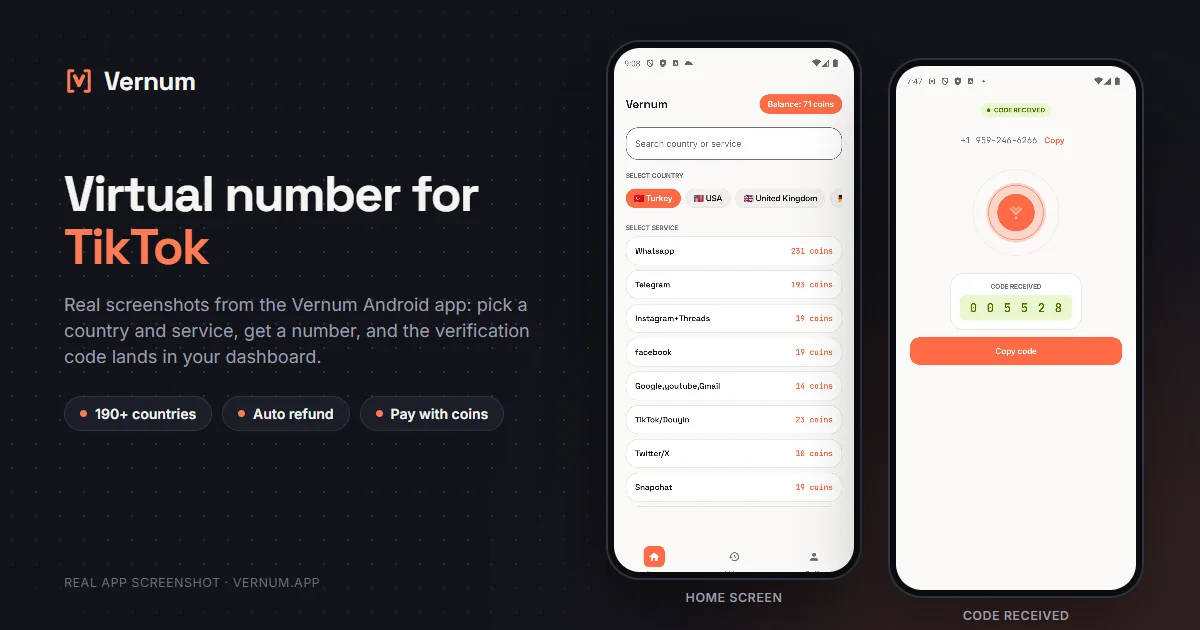
Rent a temporary number from Vernum, enter it in TikTok and read the verification code from your panel. If no code arrives, your coins are refunded automatically — retry with a different country within seconds.
Select the TikTok service in the panel; countries are sorted by measured success rate.
A real number is assigned to you, ready to receive the code.
Enter the number in TikTok; the incoming verification code appears instantly in your panel and as a notification.
TikTok sign-up is ordinary until you hit the phone field; the order below gets you through the code without missing it and locks the account down right after.
US, UK and Vietnam numbers commonly work for TikTok verification. TikTok codes sometimes arrive with a few minutes' delay — wait out the activation window; if it expires, the refund is automatic anyway.
Catalog snapshot from 2026-09-05 — the countries where TikTok numbers are cheapest, in coins. 1 coin ≈ $0.01; see the catalog page for live prices and all 190 countries.
| Country | Price |
|---|---|
| 🇦🇴 Angola | 25 coins |
| 🇦🇷 Argentina | 25 coins |
| 🇦🇹 Austria | 25 coins |
| 🇦🇿 Azerbaijan | 25 coins |
| 🇧🇩 Bangladesh | 25 coins |
| 🇧🇬 Bulgaria | 25 coins |
Your own country stays selected in TikTok's country menu while the number comes from somewhere else. The code never arrives and the timer runs out; switch the country code before pasting the number.
Once the code arrives, the number goes back to the pool. Opening a second account with it or requesting a login code later will not work; every verification needs a fresh number.
With the number gone, email is your only recovery path. If you log out without adding one, TikTok may ask for a login code on a new device and you will not be able to get back in.
Many sign-ups from the same phone in a short time can hit TikTok's registration limit, and the account will not open even though the code arrived. Create accounts as you need them, spaced out.
Which one makes sense depends on how long you will keep the account and what you will use it for.
| Situation | Recommendation |
|---|---|
| Your main brand or creator account | Your own number: recovery and account security should rest on a permanent number, and an account you will pour years into is not worth the gamble. |
| A test, viewing or follow-only account | Virtual number: there is no reason to hand TikTok your real number for an account you would not miss. |
| Your number is already tied to another TikTok account | Virtual number: TikTok links a number to one account, so a second profile needs a new number, and a one-time verification covers it. |
| You will use payment or gifting features | Your own number: on accounts with money involved, TikTok may ask you to re-verify, and you need to be able to reach the number at that moment. |
The country list is ordered by real measured delivery success — you choose by data, not luck.
If the timer runs out before a code arrives, your coins return to your balance on their own.
A live catalog refreshed hourly, with dozens of operator pools per country.
Keep personal and creator accounts on separate numbers — your main line never touches TikTok.
Create a Vernum account, add coins, then pick a country and the TikTok service. A number is assigned instantly; enter it in TikTok and the incoming SMS code shows up in your panel.
Live streaming and some features depend on both a follower threshold and a verified account. Verification done with a virtual number satisfies the account requirement; you'll still need to pass TikTok's follower threshold to unlock live.
If the number expires before a code arrives, the coins you spent are refunded to your balance automatically. You can retry immediately with a different country or operator.
Yes — renting a virtual number and using it for TikTok verification is legal; it is a legitimate privacy tool for keeping your real number to yourself. TikTok's own rules are about how the account is used: fraud, spam or impersonation are prohibited there as on any platform.
The number is reserved for you until the TikTok code arrives; once the code shows in your dashboard and verification is done, the number goes back to the pool. If TikTok ever asks to re-verify you may not have access to the same number, so enable TikTok's two-step verification right after creating the account.
The dashboard shows the number together with its country code. In TikTok, pick the country code from the menu, then type only the remaining digits; no plus sign, leading zero or spaces. This is the single most common snag.
That error comes from TikTok and usually clears after a short wait. If the code reached the dashboard, the number counts as used; wait a few minutes and enter the same code. If the code has expired, rent a new number from the dashboard.
Yes. Under Settings and privacy > Account you can change the phone number; TikTok sends a code to the new number and the old link is removed. If you plan to keep the account for a long time, this is the cleanest transition.
Free receive-SMS websites list the same few public numbers for everyone. Anyone can read the codes on the page, and TikTok has usually seen those numbers many times, so they tend to be rejected or already tied to another account. A number rented on Vernum is assigned only to you for the activation window and the code appears only in your own panel. Numbers for TikTok start from 25 coins, and if no code arrives, the coins are refunded automatically.
Create an account, add coins and rent your first number in seconds. If no code arrives, the refund is automatic.
Go to dashboard →