Vernum
SMS Verification · Virtual Number

Snapchat Virtual Number for SMS Verification

Snapchat wants a phone number to finish signing up and you'd rather not hand over yours? Rent a temporary number and see the Snapchat code in your dashboard.

190+ countries Instant delivery Automatic refund
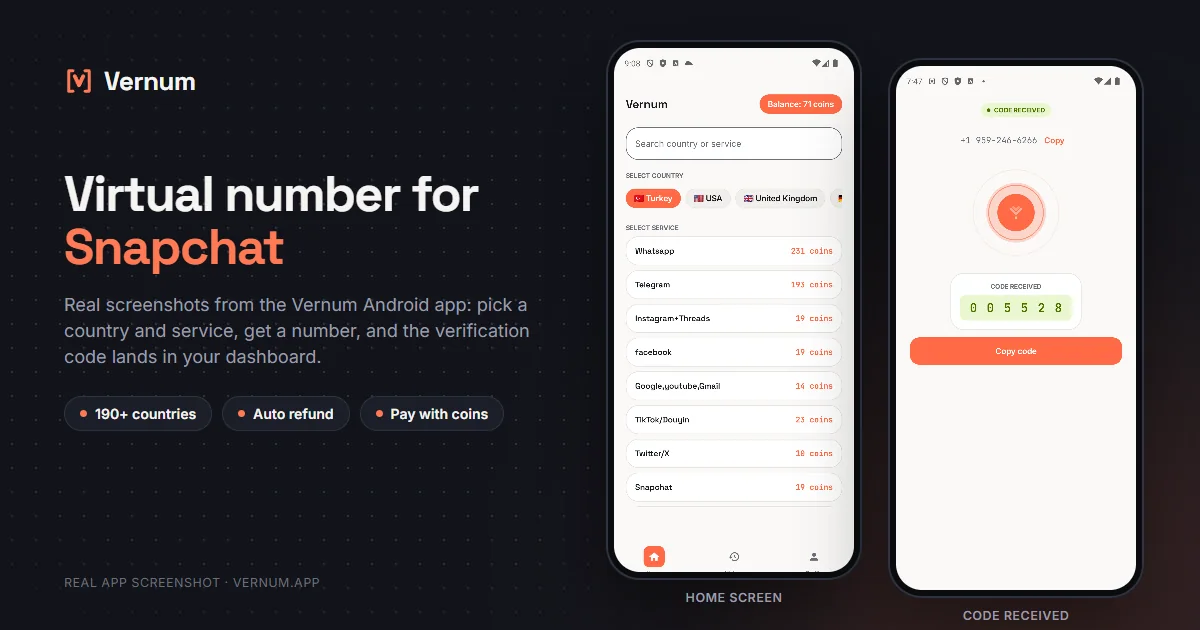
Vernum Android app screenshots: choosing a country and service on the home screen, then the received SMS verification code for Snapchat
Real app screens: pick a country and service, get a number, and the Snapchat verification code lands in your dashboard.

Why a virtual number for Snapchat?

Snapchat asks for a phone number when you create an account and on logins it doesn't recognize; that number becomes your recovery path and the way friends find you through contact matching. Not everyone wants their personal number in that system, and carrying a second SIM just for a second account is a hassle. A virtual number fixes this: rent a real single-use number from Vernum, type it into Snapchat, and the verification code lands straight in your Vernum dashboard. Your own number stays out of it entirely.

The number is reserved only for your activation and goes back to the pool once the code arrives and you've finished verifying. If the timer runs out with no code, the coins you spent are refunded to your balance automatically, so retrying costs you nothing extra.

Get your code in three steps

1

Pick a country and service

Pick the Snapchat service in the dashboard; countries are sorted by measured success rate.

2

Get your number instantly

A real number is assigned to you, ready to receive the code.

3

See the code in your dashboard

Enter the number in Snapchat; the incoming verification code appears in your dashboard and as a notification.

Step by step: verifying Snapchat with a virtual number

Snapchat uses the phone number both for verification and for finding friends; the order below gets you the code and keeps the number from sticking to the account more than it needs to.

  1. In the Vernum dashboard search for Snapchat and select it. Countries are sorted by measured success rate; rent a number from one near the top. The countdown starts and the number is reserved for you.
  2. In the Snapchat app tap Sign up and enter your name, birthday and username. On the phone screen, match the country code to the number's country, paste the remaining digits without spaces and tap Continue.
  3. Return to the Vernum dashboard. The code appears there and as a notification; if the timer ends first, coins are refunded automatically and you retry with the next country. Enter the code in Snapchat.
  4. Snapchat then asks for access to your contacts. On an account opened with a virtual number, skip this with Not now; your contacts are not matched to the account and the number serves verification only.
  5. Once the account exists, open Settings from your profile icon, add an address under Email and confirm it through the link. Then turn on Two-Factor Authentication with the authentication app option, not the SMS option.
  6. Finally, in the Mobile Number section of Settings, turn off the option that lets others find you by your number. If you will keep the account long term, consider replacing it with your own here.

Which country's number works best?

Snapchat tends to ask for extra checks more often when a number's country doesn't match where the account is being used, so numbers from Europe and North America usually go through more smoothly for most people. Which country works best on a given day still shifts with the operator. Vernum sorts the country list by real measured delivery success; start from the top, and if no code arrives, take the refund and try the next one down.

Snapchat virtual number prices

Catalog snapshot from 2026-08-26 — the countries where Snapchat numbers are cheapest, in coins. 1 coin ≈ $0.01; see the catalog page for live prices and all 175 countries.

CountryPrice
🇧🇷 Brazil2 coins
🇬🇧 United Kingdom2 coins
🇮🇩 Indonesia2 coins
🇰🇪 Kenya2 coins
🇰🇬 Kyrgyzstan2 coins
🇰🇿 Kazakhstan2 coins

Common mistakes in Snapchat verification

Granting contacts access automatically

If Snapchat syncs your contacts, the account you opened with a virtual number gets matched to your real people and the privacy point is lost. Skip the permission screen; you can enable it later if needed.

Choosing SMS for two-factor authentication

Snapchat offers SMS and an authentication app for 2FA. The SMS option tied to a single-use number locks you out at the first new-device login; use the app option.

Leaving the account without an email

For password resets Snapchat sends a code to the phone or the email. Once the number is released, without an email there is no easy way to get the account back.

Taking too long to move the code between apps

Snapchat's code is short-lived. Enter it the moment you see it in the dashboard; if you wait, Snapchat asks for a new code and the number may no longer be reserved to receive a second message.

Virtual number or your own number?

Because the number on Snapchat also drives friend discovery, the decision depends on who you want to be able to find the account.

SituationRecommendation
Your main account that friends find from their contactsYour own number: Quick Add and contact matching work through your real number, and account recovery rests on the same number.
A second or anonymous account that connects to no oneVirtual number: no contact matching, your contacts cannot find you, and the account is known only by its username.
You will keep the account but do not want to give Snapchat your numberVirtual number plus a confirmed email: the virtual number passes verification, while email and an authentication app take over recovery.
You will use a paid feature like Snapchat+Your own number: it makes no sense to leave the chance of losing a paid account hanging on a rented number.

Why Vernum?

🎯 Sorted by success rate

The country list is ordered by real measured delivery success — you choose by data, not luck.

↩️ Automatic refund

If the timer runs out before a code arrives, your coins return to your balance on their own.

🌍 190+ countries

A live catalog refreshed hourly, with dozens of operator pools per country.

👻 A second Snapchat account

Keep a personal account and a creator account apart without buying a second SIM.

Frequently asked questions

How do I get a virtual number for Snapchat?

Create a Vernum account, add coins, then pick a country and the Snapchat service. A number is assigned instantly; enter it in Snapchat and the incoming SMS code shows up in your dashboard and as a notification.

Will a Snapchat account created with a virtual number keep working?

Yes, once it's set up the account works like any other. The number itself is single-use, so if Snapchat ever asks you to re-verify you may not have access to it again. Add and confirm an email address right away, and turn on two-factor authentication in Settings using an authenticator app.

What if the Snapchat code doesn't arrive?

If the number expires before a code arrives, the coins you spent are refunded to your balance automatically. Pick a different country from the list and try again right away.

Is it legal to use a virtual number on Snapchat?

Yes. Renting a virtual number and using it for verification is legal; it's a legitimate privacy tool for keeping your real number out of Snapchat's contact matching. Snapchat's Community Guidelines are about how the account is used: impersonation, harassment and spam are prohibited there as on any platform.

How long is the number mine?

The number is reserved for you until the Snapchat code arrives; once verification is done it returns to the pool. If you plan to keep the account for a long time, verify your email in Snapchat and enable two-factor authentication so logins and recovery don't depend on that number.

Doesn't Snapchat accept email instead of a phone at sign-up?

In most regions Snapchat also accepts email sign-up, but in some cases and on logins it finds suspicious it asks for phone verification. A virtual number is enough for that one-time request; afterwards email becomes the account's main recovery channel.

Can my friends find a Snapchat account opened with a virtual number from my phone number?

No. Snapchat matches people by number; since the virtual number is in nobody's contacts, you do not show up in Quick Add. They can only add you by username or Snapcode.

What happens if Snapchat later asks me to re-verify my number?

Because the number is single-use, no code will reach it again. If email and an authentication app are set, Snapchat usually offers one of those routes instead; if they are not set, adding them right after opening the account is the only real precaution.

Related guides

Get your Snapchat code now.

Create an account, add coins and rent your first Snapchat number in seconds. If no code arrives, the refund is automatic.

Go to dashboard →