Vernum
SMS Verification · Virtual Number

PayPal Virtual Number for SMS Verification

PayPal wants phone verification at sign-up and you'd rather not give one more payment service your personal number? Rent a temporary number for that step and see the PayPal code in your dashboard.

190+ countries Instant delivery Automatic refund
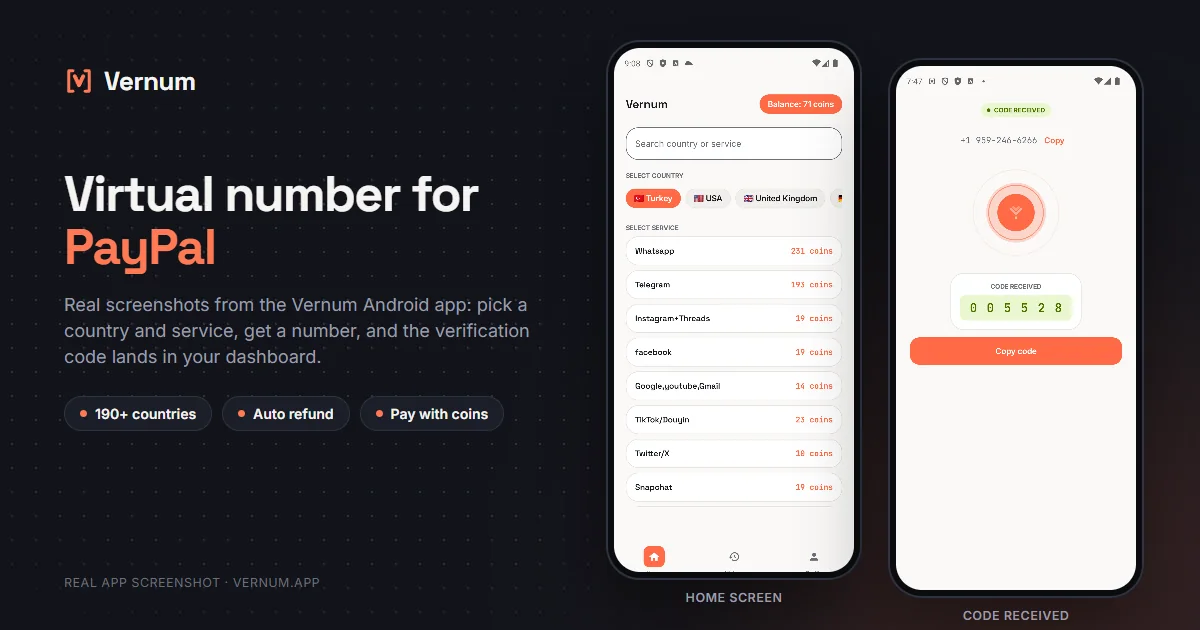
Vernum Android app screenshots: choosing a country and service on the home screen, then the received SMS verification code for PayPal
Real app screens: pick a country and service, get a number, and the PayPal verification code lands in your dashboard.

Why a virtual number for PayPal?

PayPal asks for a phone number when you open an account, sends an SMS code to confirm it, and later uses it for login alerts and recovery. If you'd rather not give one more payment service your personal number, a virtual number does the job: rent a real single-use number from Vernum, type it into PayPal, and the code lands straight in your Vernum dashboard. It covers only the phone step: your name, address, country and payment details must be genuine, and PayPal may still verify your identity.

The number is reserved only for your activation and goes back to the pool once the code arrives and you've finished verifying. If the timer runs out with no code, the coins you spent are refunded to your balance automatically, and you can retry with another number right away.

Get your code in three steps

1

Pick a country and service

Pick the PayPal service in the dashboard; countries are sorted by measured success rate.

2

Get your number instantly

A real number is assigned to you, ready to receive the code.

3

See the code in your dashboard

Enter the number in PayPal; the incoming verification code appears in your dashboard and as a notification.

Step by step: verifying PayPal with a virtual number

PayPal asks for a phone number during sign-up and sends an SMS code to it before you can finish; here is what to do in the Vernum dashboard and on PayPal's screen at each point.

  1. Sign in to the Vernum dashboard, type PayPal into the service search box, and pick one of the top countries in the list; the list is ordered by measured delivery success for this service.
  2. Rent the number and note the countdown on the number card; you need to submit the number to PayPal before the timer runs out, or the coins come back to your balance automatically.
  3. On PayPal's sign-up page, set the account country to match the number you rented; the phone field already carries the country code, so paste the number without repeating the prefix.
  4. Submit the form and PayPal sends a six-digit SMS code; switch back to the Vernum dashboard and watch the number card, or wait for the notification if you are using the Android app.
  5. Type the code into PayPal's verification field and continue; once the account is created, the number is released on Vernum's side, and being single-use it will not work for a second attempt.
  6. Right after sign-up, open PayPal's Settings > Security, confirm your email address, and add an authenticator app for two-step login so you never depend on that phone number again.

Which country's number works best?

PayPal generally expects the phone number's country code to match the country your account is registered in, so start with a number from the same country as your PayPal account. A number from a different country can get the verification rejected. Within that country, which operator works best varies; Vernum sorts the list by real measured delivery success. Start with the top option for your country, and if no code arrives, take the refund and try the next one.

PayPal virtual number prices

Catalog snapshot from 2026-08-26 — the countries where PayPal numbers are cheapest, in coins. 1 coin ≈ $0.01; see the catalog page for live prices and all 187 countries.

CountryPrice
🇵🇭 Philippines10 coins
🇹🇯 Tajikistan10 coins
🇧🇷 Brazil14 coins
🇮🇩 Indonesia14 coins
🇮🇳 India14 coins
🇰🇿 Kazakhstan14 coins

Common mistakes in PayPal verification

Country and number don't match

If the account country you pick on PayPal differs from the number's country code, the form rejects it. Select the same country you rented the number from.

Pasting the prefix twice

PayPal's phone field adds the country code on its own. Pasting a number that already starts with +44 or +33 produces an invalid number, and no SMS is sent.

Requesting the code after the timer

Once the countdown on the number card ends, any SMS sent to that number never reaches you. Check the timer in the dashboard before you press resend on PayPal.

Skipping the recovery setup

Virtual numbers are single-use, so a later PayPal code sent to the same number is lost. Add an email and an authenticator app immediately after your first login.

Virtual number or your own number?

PayPal is a payment account, so the right choice depends on how long you will keep the account and how much money you plan to move through it.

SituationRecommendation
Your main PayPal account with real money flowYour own number: PayPal texts the registered number during suspicious-activity checks and account recovery, and losing access to it can leave the account locked.
A short-lived account for a single purchaseVirtual number: if you only need the account briefly, passing the verification step without exposing your real number is enough.
You don't want PayPal storing your real numberVirtual number, but add an authenticator app and a backup email right away so SMS is never your only login method.
PayPal keeps rejecting your current numberVirtual number: trying a number from a different country usually clears the error; start with the countries at the top of Vernum's list.

Why Vernum?

🎯 Sorted by success rate

The country list is ordered by real measured delivery success — you choose by data, not luck.

↩️ Automatic refund

If the timer runs out before a code arrives, your coins return to your balance on their own.

🌍 190+ countries

A live catalog refreshed hourly, with dozens of operator pools per country.

🔐 A separate number for sign-up

Get through PayPal's phone verification without entering your real number, then move login security to app-based verification.

Frequently asked questions

How do I get a virtual number for PayPal?

Create a Vernum account, add coins, then pick the country your PayPal account is registered in and the PayPal service. A number is assigned instantly; enter it on PayPal's phone verification screen and the incoming SMS code shows up in your dashboard and as a notification.

Will a PayPal account verified with a virtual number keep working?

Once phone verification is done, the account is open. PayPal does ask for SMS codes often, though, on logins and some transactions, and since the number is single-use you may not have access to it again. Confirm your email as soon as the account is created, switch two-step verification to an authenticator app in Security settings, and add a number you'll keep when you can.

What if the PayPal code doesn't arrive?

If the number expires before a code arrives, the coins you spent are refunded to your balance automatically. Get another number from the same country and try again right away.

Is it legal to use a virtual number on PayPal?

Renting a virtual number and using it for SMS verification is legal; it's a legitimate privacy tool for keeping your personal number away from one more payment service. PayPal's User Agreement requires accurate identity and country information from you; a virtual number doesn't change who you are and is no substitute for identity verification. As long as your details are genuine, using it for the phone step is fine.

How long is the number mine?

The number is reserved for you until the PayPal code arrives; once verification is done it returns to the pool. Because PayPal may ask for SMS codes on later logins, confirm your email and enable two-step verification with an authenticator app right after creating the account so you never need that number again.

Does PayPal accept virtual numbers?

PayPal rejects some number ranges. Vernum orders its country list by the measured success rate for PayPal, so starting with the top countries improves your odds. If no code arrives before the timer ends, the coins are refunded and you can try another country.

Can I open a second PayPal account with the same virtual number?

No. Vernum numbers are single-use and return to the pool once the code arrives, and PayPal may not accept a number already attached to another account. Rent a fresh number for each account.

What if PayPal texts me again later?

The number you rented has already been released, so you will not see that message. That is why you should add an authenticator app or a backup email in PayPal's settings right after sign-up; PayPal can verify logins through those methods instead.

Related guides

Get your PayPal code now.

Create an account, add coins and rent a number for your PayPal sign-up in seconds. If no code arrives, the refund is automatic.

Go to dashboard →