Vernum
SMS Verification · Virtual Number

Viber Virtual Number for SMS Verification

Setting up Viber without handing over your real number, or need a second Viber account? Rent a temporary number and read the Viber verification code in your dashboard.

190+ countries Instant delivery Automatic refund
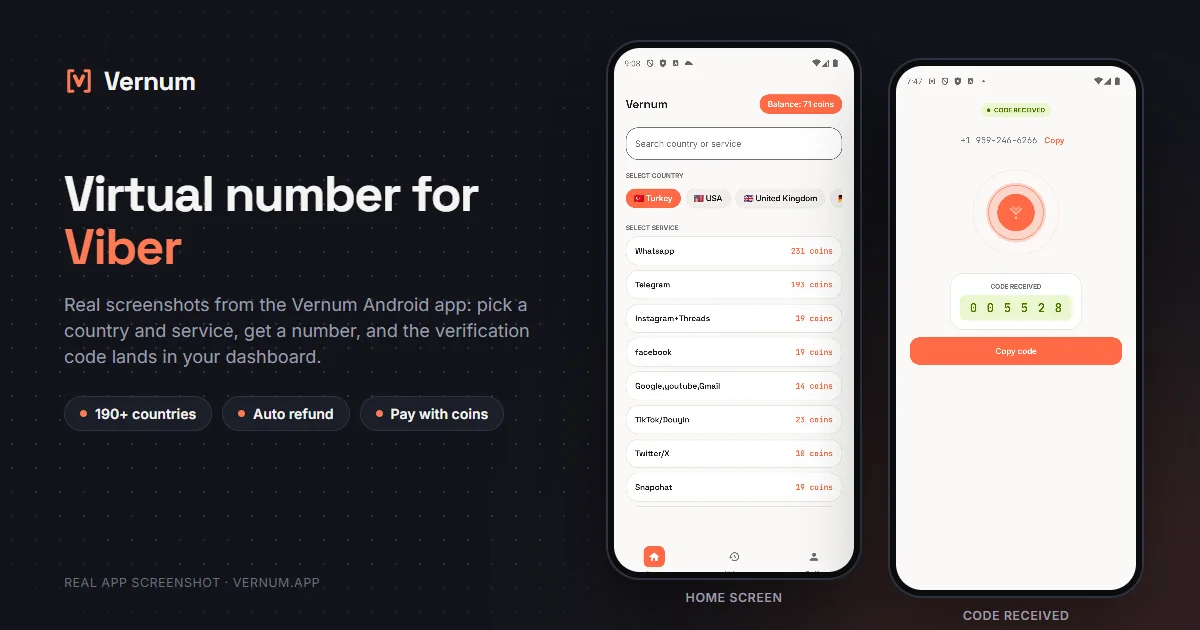
Vernum Android app screenshots: choosing a country and service on the home screen, then the received SMS verification code for Viber
Real app screens: pick a country and service, get a number, and the Viber verification code lands in your dashboard.

Why a virtual number for Viber?

Viber asks for your phone number at setup and matches it against everyone in your contacts. If you're installing the app for a single group chat or one relative abroad, you may not want your real line exposed to that matching. A virtual number separates the two: rent a real single-use number from Vernum, type it into Viber, and the incoming SMS verification code lands straight in your Vernum dashboard. Your contact list, your real number, and your main account stay where they are.

The number is reserved only for your activation; once the Viber code arrives and you finish verifying, it goes back to the pool. If no code shows up before the timer ends, the coins you spent are refunded to your balance automatically, so a number that never delivers costs you nothing. Try the next country on the list.

Get your code in three steps

1

Pick a country and service

Pick the Viber service in the dashboard; countries are sorted by measured success rate.

2

Get your number instantly

A real number is assigned to you, ready to receive the code.

3

See the code in your dashboard

Enter the number in Viber; the verification code appears in your dashboard and as a notification the moment it arrives.

Step by step: verifying Viber with a virtual number

Viber asks for a phone number the moment you install it; follow this order and you will have the code from your Vernum number within a few minutes.

  1. In the Vernum dashboard, pick the Viber service. The country list arrives sorted by measured success rate, so pick one near the top and rent the number. The number and its countdown timer appear in the dashboard right away, and it is yours alone until the code arrives.
  2. Install Viber on your phone and open it. Tap Start on the welcome screen, choose the country of your Vernum number in the country field, and type the number without the country code. Viber adds the code itself.
  3. Viber shows the number again and asks you to confirm it; do so. The SMS-sent screen opens with a waiting timer for the 6-digit code. Do not switch to the call-me option; Vernum numbers are for SMS only and cannot take voice calls.
  4. Return to the Vernum dashboard. Viber's 6-digit code appears in the dashboard and as a notification; copy it into the boxes in Viber. If the timer ends with no code, your coins go back to your balance automatically and you can start over with a different country.
  5. Once the code is accepted, Viber asks for your name and a profile photo. The contacts permission only matches your address book; it is not required for chatting, so you can decline it.
  6. Right after that, add an email address under More, Settings, Account, and turn on chat backup in the Backup section. Remember that Viber sends a fresh code to the same number whenever you reinstall, so treat this account as temporary and back up anything that matters.

Which country's number works best?

Numbers from Eastern Europe and Asia, where Viber is widely used, tend to verify without trouble, but which country is actually receiving codes right now shifts with the operator and the day. Instead of guessing, look at Vernum's ranking: the app orders the country list by real measured delivery success. Start at the top; if no code arrives the refund is automatic, so trying the next country down costs you nothing extra.

Viber virtual number prices

Catalog snapshot from 2026-08-26 — the countries where Viber numbers are cheapest, in coins. 1 coin ≈ $0.01; see the catalog page for live prices and all 196 countries.

CountryPrice
🇦🇿 Azerbaijan2 coins
🇨🇦 Canada2 coins
🇨🇱 Chile2 coins
🇨🇴 Colombia2 coins
🇬🇹 Guatemala2 coins
🇭🇰 Hong Kong2 coins

Common mistakes in Viber verification

Switching to the call-me option

When the SMS is a few seconds late, many people tap the voice call option. Calls never reach a virtual number; stay on the SMS screen and watch the Vernum dashboard instead.

Deleting and reinstalling the app

Viber sends a new code to the same number on every reinstall. The single-use number has already returned to the pool, so you will never see that code; accept before deleting that this is not a permanent account.

Typing the number without fixing the country

Viber guesses the country from the SIM in your phone. If your Vernum number is from somewhere else and you do not pick the country manually, the SMS leaves with the wrong country code and never arrives.

Trying to verify the desktop app separately

Viber for desktop and tablet links to the account on your phone through a QR code and never asks for a second SMS. Typing the number into the desktop app and waiting for a new code just wastes coins.

Virtual number or your own number?

A Viber account is tightly bound to its number, so decide based on how long you want to keep the account.

SituationRecommendation
An account just to follow a group or communityVirtual number — reading and the occasional reply do not justify exposing your real number to a group of strangers.
You plan to buy Viber Out credit and make callsYour own number — if there is money on the account, losing access to the number means losing access to the credit.
You will move the account to a new phoneYour own number — during the transfer Viber sends another code to the same number, and a single-use number cannot get you past that step.
A short exchange without sharing your numberVirtual number — ideal for a classified ad, a rental, or a one-time conversation; delete the account when you are done and leave nothing behind.

Why Vernum?

🎯 Sorted by success rate

The country list is ordered by real measured delivery success — you choose by data, not luck.

↩️ Automatic refund

If the timer runs out before a code arrives, your coins return to your balance on their own.

🌍 190+ countries

A live catalog refreshed hourly, with dozens of operator pools per country.

📞 A second Viber for contacts abroad

Need Viber for relatives or business partners overseas? Open a separate Viber account without giving out your real line.

Frequently asked questions

How do I get a virtual number for Viber?

Create a Vernum account, add coins, then pick a country and the Viber service. A number is assigned instantly; enter it in the Viber app and the incoming SMS code shows up in your dashboard and as a notification.

Will a Viber account opened with a virtual number keep working?

Yes, once verified the account works normally. The number itself is single-use, so if Viber ever asks you to re-verify or you move the app to a new phone, you may not have access to it again. For an account you plan to keep, link an email address in Viber's settings and turn on chat backup.

What happens if the Viber code doesn't arrive?

If the number expires before a code arrives, the coins you spent are refunded to your balance automatically. You can retry right away with a different country or operator. If Viber offers a voice call instead, choose the resend-by-SMS option; the number you rented receives SMS codes.

Is using a virtual number for Viber legal?

Yes. Renting a virtual number and using it for Viber verification is legal; it's a legitimate privacy tool for keeping your real number out of contact matching. Viber's terms are about how the account is used: spam, fraud, and impersonation are prohibited there as on any platform.

How long is the number mine?

The number is reserved for you until the Viber code arrives; once the code shows in your dashboard and verification is done, the number goes back to the pool. If Viber ever asks you to re-verify you may not have access to the same number, so link an email address and enable chat backup in Viber's settings right after creating the account.

Can I move a Viber account created with a virtual number to a new phone?

Most likely not. When you transfer the account to a new device, Viber sends another SMS to the same number, and since that number has returned to the pool you cannot receive it. Plan to use the account on one device and keep your chats with Viber's backup feature.

What should I do if Viber says the number cannot be used?

Viber may reject certain number ranges at the signup stage. If you see that warning, pick a different country in the Vernum dashboard and rent a new number; the coins for a number that never received a code are refunded automatically when the timer ends.

Can Viber call a Vernum number for voice verification?

No. Vernum numbers are reserved for receiving SMS only, and Viber's voice verification option will not work with them. Stay on the SMS screen and the code will show up in the dashboard.

Related guides

Get your Viber code now.

Create an account, add coins, and rent your first Viber number in seconds; if no code arrives, the refund is automatic.

Go to dashboard →