Vernum
SMS Verification · Virtual Number

Microsoft Virtual Number for SMS Verification

Creating a new Outlook address or a separate Microsoft account for Xbox, and the sign-up form wants a phone number? Rent a temporary number and read Microsoft's code in your dashboard.

190+ countries Instant delivery Automatic refund
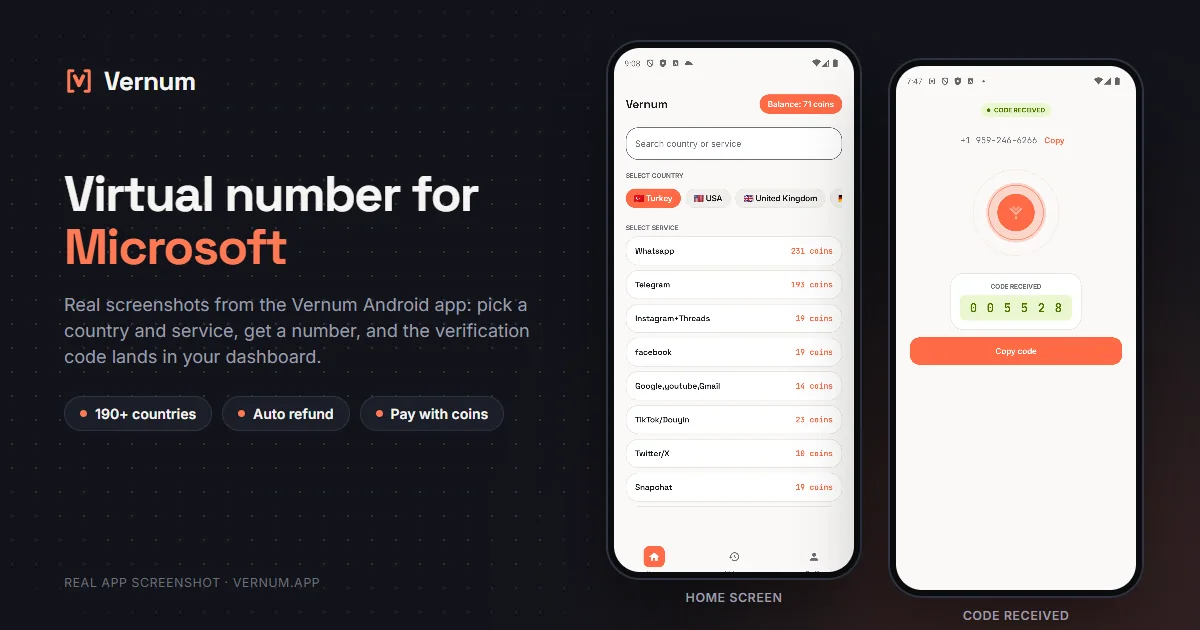
Vernum Android app screenshots: choosing a country and service on the home screen, then the received SMS verification code for Microsoft
Real app screens: pick a country and service, get a number, and the Microsoft verification code lands in your dashboard.

Why a virtual number for Microsoft?

One Microsoft account covers Outlook, Hotmail, Xbox, OneDrive and Teams, and when you create a new one Microsoft texts a code to a phone number to confirm you're not a bot, especially after several sign-ups from the same connection. A separate Outlook address for work, a second Xbox profile, or not wanting your real number tied to an email account all call for a number you don't otherwise use. Rent a real single-use number from Vernum, enter it on Microsoft's verification screen, and the code lands in your Vernum dashboard.

The number is reserved only for your activation; once the code arrives and you finish verifying, it is released. If the timer runs out before a code shows up, the coins you spent go back to your balance automatically, and you can retry with another country right away.

Get your code in three steps

1

Pick a country and service

Pick the Microsoft service in the dashboard; countries are sorted by measured success rate.

2

Get your number instantly

A real number is assigned to you, ready to receive the code.

3

See the code in your dashboard

Enter the number on Microsoft's verification screen; the incoming code appears instantly in your dashboard and as a notification.

Step by step: verifying Microsoft with a virtual number

Outlook, Hotmail, and Xbox all run on a single Microsoft account; during sign-up Microsoft may send an SMS to a phone number to prove you are not a robot and to add it as security info.

  1. In the Vernum dashboard, type Microsoft into the search box; the country list is ordered by measured success rate for this service. Choose a country from the top of the list and rent the number.
  2. Note the countdown on the number card and open the Microsoft account creation page; if no code arrives before the timer ends, the coins return to your balance and you can try again.
  3. In Microsoft's sign-up flow, choose your new email address and password; when the phone step appears, select the country of the number you rented from the country code list and paste the number without the prefix.
  4. Click Send code; Microsoft sends a verification code by SMS. Go back to the Vernum dashboard, where the code shows on the number card, and if you use the Android app it arrives as a notification too.
  5. Enter the code in Microsoft's field and finish sign-up; the number is released on Vernum and, being single-use, cannot be used for a second Microsoft account.
  6. Once the account exists, go to Security at account.microsoft.com, add the Microsoft Authenticator app and a backup email; you sign in to Xbox with this same account.

Which country's number works best?

Microsoft's acceptance of a number can differ by country and operator; some number ranges get rejected more often, and that changes over time, so trusting measurement beats trusting a fixed list. Vernum sorts the country list by real measured delivery success for the Microsoft service: start at the top, and if no code arrives, take the refund and move one row down. Where you can, choosing a number from the country you'll use the account in keeps things simpler.

Microsoft virtual number prices

Catalog snapshot from 2026-08-26 — the countries where Microsoft numbers are cheapest, in coins. 1 coin ≈ $0.01; see the catalog page for live prices and all 198 countries.

CountryPrice
🇨🇲 Cameroon2 coins
🇨🇴 Colombia2 coins
🇪🇬 Egypt2 coins
🇮🇩 Indonesia2 coins
🇮🇱 Israel2 coins
🇮🇳 India2 coins

Common mistakes in Microsoft verification

Leaving the phone as your only security info

Microsoft sends a code to the registered phone on new-device logins or suspicious activity. If a released virtual number is your only security info, you are locked out; add Authenticator and a backup email.

Trying to create a separate Xbox account

Xbox is not a separate account system; the Microsoft account you created for Outlook works on Xbox too. There is no need to rent a second number.

Not picking the country code from the list

In Microsoft's phone step the country code comes from a dropdown. Pasting the number with its prefix without changing the dropdown means no code is sent.

Refreshing the page before the code lands

Refreshing the sign-up page makes Microsoft start a new code request and invalidates the previous one. Watch the number card in the dashboard and use the first code that arrives.

Virtual number or your own number?

A Microsoft account ties together email, Xbox, OneDrive, and Windows sign-in, so the choice depends on how central this account is for you.

SituationRecommendation
Your main account tied to Windows and OneDriveYour own number: losing this account also affects your files and devices, and recovery codes go to the registered number.
A second Outlook address needed only for sign-upsVirtual number: pass verification, then add Authenticator; day-to-day use will not need a phone at all.
An Xbox gaming account where you'll buy gamesYour own number, or a virtual number plus Authenticator: purchases and account recovery rely on security info, and SMS should not be the only path.
Your own number is already attached to many accountsVirtual number: Microsoft may limit how often the same number can be reused, and a number from a different country usually works.

Why Vernum?

🎯 Sorted by success rate

The country list is ordered by real measured delivery success — you choose by data, not luck.

↩️ Automatic refund

If the timer runs out before a code arrives, your coins return to your balance on their own.

🌍 190+ countries

A live catalog refreshed hourly, with dozens of operator pools per country.

📧 A second Outlook address

Open a new Outlook account to keep work and personal mail apart, and get through phone verification without giving out your real number.

Frequently asked questions

How do I get a virtual number for Microsoft?

Create a Vernum account, add coins, then pick a country and the Microsoft service. A number is assigned instantly; when Microsoft asks for phone verification during Outlook, Hotmail or Xbox sign-up, enter it and the incoming SMS code shows up in your dashboard.

Will a Microsoft account opened with a virtual number keep working?

Yes, once verified, Outlook, Xbox and the other Microsoft services work normally. The number itself is single-use, though, so if Microsoft later sends a code to it for a security check you won't be able to receive it. Right after sign-up, link the Microsoft Authenticator app, add a recovery email, and remove the virtual number from your recovery methods in the account security settings.

What happens if the Microsoft code doesn't arrive?

If the number expires before a code arrives, the coins you spent are refunded to your balance automatically. You can retry immediately with a different country or operator; Microsoft may never send an SMS to some number ranges at all, and the refund works the same way in that case.

Is using a virtual number for Microsoft legal?

Yes. Renting a virtual number and using it to verify a Microsoft account is legal; it is a legitimate way to keep your real number off an email account. The Microsoft Services Agreement is about how the account is used: bulk account creation, sending spam, or impersonating someone violate its rules and can get the account closed.

How long is the number mine?

The number is reserved for you until the Microsoft code arrives; once the code shows in your dashboard and verification is done, the number goes back to the pool. If Microsoft later sends another code to the same number you won't have access to it, so link Microsoft Authenticator and add a recovery email right after creating the account.

Does Microsoft always ask for a phone at sign-up?

No. Some sign-ups only require a visual challenge, while others make the SMS code mandatory. Rent a number from Vernum the moment the phone step appears; there is no need to get one in advance.

Can I remove the virtual number from the account later?

Yes. From the Security info page you can remove the phone and keep Authenticator or a backup email instead. Microsoft may apply a waiting period to security info changes, so it is best to make the change right after creating the account.

Can I get both an Outlook and a Hotmail address with one number?

Both live in the same Microsoft account system, and you create a single account. If you want two separate accounts, you need a separate number for each; Vernum numbers are single-use and return to the pool once the code arrives.

Related guides

Get your Microsoft code now.

Create an account, add coins and rent a number for your new Outlook or Xbox account in seconds. If no code arrives, the refund is automatic.

Go to dashboard →