Vernum
SMS Verification · Virtual Number

LinkedIn Virtual Number for SMS Verification

LinkedIn asked for phone verification at sign-up or login, and you'd rather not tie your personal number to a public professional profile? Rent a temporary number and see the LinkedIn code in your dashboard.

190+ countries Instant delivery Automatic refund
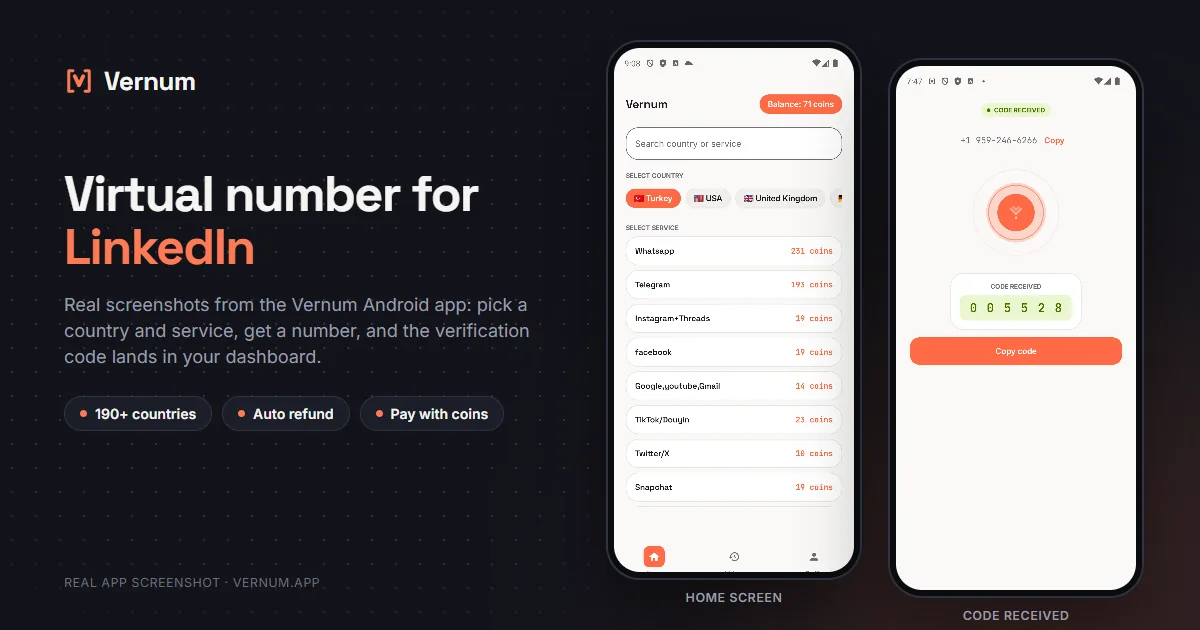
Vernum Android app screenshots: choosing a country and service on the home screen, then the received SMS verification code for LinkedIn
Real app screens: pick a country and service, get a number, and the LinkedIn verification code lands in your dashboard.

Why a virtual number for LinkedIn?

LinkedIn asks for phone verification on new accounts and unusual logins to cut down on fake profiles; that number also becomes your recovery channel. The catch is that a public professional profile, recruiters and connections you've never met are not always people you want holding your personal number. A virtual number separates that step: rent a real single-use number from Vernum, enter it where LinkedIn asks, and the verification code lands straight in your Vernum dashboard. Your own number never gets tied to the profile.

The number is reserved only for your activation and returns to the pool once the code arrives and you've finished verifying. If the timer runs out with no code, the coins you spent are refunded to your balance automatically, and you can retry with another country right away.

Get your code in three steps

1

Pick a country and service

Pick the LinkedIn service in the dashboard; countries are sorted by measured success rate.

2

Get your number instantly

A real number is assigned to you, ready to receive the code.

3

See the code in your dashboard

Enter the number in LinkedIn; the incoming verification code appears in your dashboard and as a notification.

Step by step: verifying LinkedIn with a virtual number

LinkedIn slips the phone check in as a security step rather than a sign-up field; rent the number at exactly that moment and the countdown is not wasted.

  1. Sign up for LinkedIn with an email, name and password. If LinkedIn stops you with a quick security check asking for a phone number, stay on that screen and rent the number only then.
  2. In the Vernum dashboard pick LinkedIn from the service list. Countries are sorted by measured success rate; rent a number from one near the top. The countdown starts and the number is reserved for you.
  3. On LinkedIn's phone screen, select the number's country from the menu, paste the remaining digits without spaces and click Send code. LinkedIn adds the country code itself; do not add a plus sign or zero.
  4. Return to the Vernum dashboard. The 6-digit code appears there and as a notification; if the timer ends first, coins are refunded automatically and you retry with the next country. Enter the code in LinkedIn.
  5. Once sign-up is complete, go to Settings and Privacy > Sign in and security. Check that your email addresses are confirmed and add a second email if you can; LinkedIn leans on email for recovery.
  6. In the same section, turn on Two-step verification with the Authenticator app option, not SMS. Then, under Phone numbers, remove the virtual number, or replace it with your own for a long-term account.

Which country's number works best?

LinkedIn may ask for extra checks when the number's country doesn't match the location on your profile, so countries close to where you actually use the account tend to go more smoothly. European and North American numbers are a reasonable start for most people. Which one works best right now depends on the operator; Vernum sorts the list by real measured delivery success. Start at the top, and if no code arrives, take the refund and move down.

LinkedIn virtual number prices

Catalog snapshot from 2026-08-26 — the countries where LinkedIn numbers are cheapest, in coins. 1 coin ≈ $0.01; see the catalog page for live prices and all 188 countries.

CountryPrice
🇦🇴 Angola2 coins
🇧🇷 Brazil2 coins
🇨🇦 Canada2 coins
🇨🇴 Colombia2 coins
🇰🇿 Kazakhstan2 coins
🇹🇯 Tajikistan2 coins

Common mistakes in LinkedIn verification

Using it for a second profile

LinkedIn's rules allow one account per person; if a second profile is detected, both can be restricted. A virtual number is for keeping your real number private, not for a second identity.

Renting the number too early

LinkedIn does not ask for the phone check on every sign-up or at the same point. If you rent before the security screen shows up, the countdown drains; see the screen first, then rent.

Refreshing the page before the code arrives

Refreshing sometimes makes LinkedIn send a new code and treat the old one as invalid. Leave the sign-up tab alone while you wait in the dashboard; when the code comes, enter the most recent one.

Turning on SMS-based two-step verification

SMS verification tied to a single-use number locks you out at the next new-device login. The authenticator app option does not depend on the number; use that one.

Virtual number or your own number?

LinkedIn is your professional identity, so the decision here deserves more caution than on other platforms.

SituationRecommendation
Your career profile and job applicationsYour own number: if the account gets restricted LinkedIn may ask for identity verification, and the profile is a reference you built over years.
You do not want to give LinkedIn your numberVirtual number plus two confirmed emails: the virtual number passes the security check, while recovery runs through email and an authenticator app.
An account opened to manage a company pageYour own number: page admin rights are tied to the personal account, and losing that account puts the page at risk too.
An account only for watching job listingsVirtual number: for an account with no filled-out profile and no applications, handing over your real number is unnecessary.

Why Vernum?

🎯 Sorted by success rate

The country list is ordered by real measured delivery success — you choose by data, not luck.

↩️ Automatic refund

If the timer runs out before a code arrives, your coins return to your balance on their own.

🌍 190+ countries

A live catalog refreshed hourly, with dozens of operator pools per country.

💼 Separate work and personal

Set up your professional profile without linking your personal number; recruiter calls and connection requests stay off your private line.

Frequently asked questions

How do I get a virtual number for LinkedIn?

Create a Vernum account, add coins, then pick a country and the LinkedIn service. A number is assigned instantly; enter it on LinkedIn's phone verification screen and the incoming SMS code shows up in your dashboard and as a notification.

Will a LinkedIn account verified with a virtual number keep working?

Yes, once verification is complete the account works normally. The number is single-use, so if LinkedIn asks for another SMS code on a new device later, you may not have access to it. Keep a verified email on the account and turn on two-step verification with an authenticator app so future logins don't depend on that number.

What if the LinkedIn verification code doesn't arrive?

If the number expires before a code arrives, the coins you spent are refunded to your balance automatically. Pick a different country and try again right away.

Is it legal to use a virtual number on LinkedIn?

Yes. Renting a virtual number and using it for phone verification is legal; it's a legitimate privacy tool for keeping your personal number away from a public professional profile. LinkedIn's User Agreement asks you to use your real name and a single profile; a virtual number doesn't change who you are, it only protects your contact number.

How long is the number mine?

The number is reserved for you until the LinkedIn code arrives; once verification is done it returns to the pool. If you'll use the account for a long time, verify your email on LinkedIn and enable two-step verification in Settings so later logins never need that number.

Why does LinkedIn ask for a phone number during sign-up?

LinkedIn uses the phone check to weed out fake accounts and shows it in situations it decides on, not on every sign-up. A virtual number is enough for that one-time request; the number does not have to stay on the account afterwards.

Can I remove the virtual number from my LinkedIn account later?

Yes. Under Phone numbers in Sign in and security you can delete the number or add a new one. As long as a confirmed email remains on the account, LinkedIn allows it.

Will a virtual number help if my LinkedIn account gets restricted?

When lifting a restriction LinkedIn usually sends a code to your email or asks for an ID document; the phone alone is not the deciding factor. That is why confirming your email right after opening the account matters more than the number later on.

Related guides

Get your LinkedIn code now.

Create an account, add coins and rent your first LinkedIn number in seconds. If no code arrives, the refund is automatic.

Go to dashboard →